

I was doing some research the other night.
I remembered the AAC Auto Login and the similar style done in Interface.
Thinking about that, I'm tinkering with this here, screenshots below.
Currently tested: In Systems:
C4
Lucera Interlude
Lucera Interlude Classic (166)
Essence:
474 (Assassin)
509 (Wolf)
520 (Rose)
542 (Samurai)
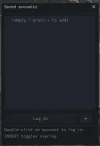
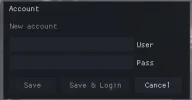
Accounts are not saved in the System.
So there's no problem sharing the System with other users and forgetting to delete the "AutoLogin.ini" file.
When you type your login and password in the game, it's saved automatically.
You can delete the accounts.
I'm still developing, improving, and fixing bugs; I'll add support for more clients.
I'll see if it's possible to add it to C4 and lower (I'll check later). Add it to HELLBOUND, GRACIA, HIGH FIVE, and other chronicles where possible.
===== TUTORIAL ====
Currently, I leave the DLL as l2ui.dll or rename the dll...
You can name it anything.
I tested it on a C4 server and it worked.
Using CFF Explorer to link the DLL to ENGINE.DLL
CFF Explorer Download: https://ntcore-com.translate.goog/explorer-suite/
Drag ENGINE.DLL into the program.
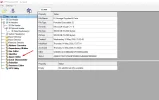
Then in Importer Adder
Select your dll (L2UI.DLL or the name you gave it)
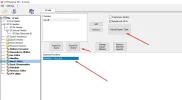
Select the L2UI_init function.
Click on Import by Ordinal or by Name.
Finally, Rebuild Import Table.
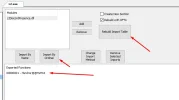
Click on SAVE at the top.
Overwrite YES. (make a backup of your l2.exe)
Download the DLL: https://www.mediafire.com/file_premium/0kqo4gxylaaf2sj/auto_save_v1.zip/file
Password: byLitch
Open Source: https://github.com/luannbr/L2AutoLoginSave
Tested on
C4, Interlude, 474, 509, 520, 542.
I remembered the AAC Auto Login and the similar style done in Interface.
Thinking about that, I'm tinkering with this here, screenshots below.
Currently tested: In Systems:
C4
Lucera Interlude
Lucera Interlude Classic (166)
Essence:
474 (Assassin)
509 (Wolf)
520 (Rose)
542 (Samurai)
Accounts are not saved in the System.
So there's no problem sharing the System with other users and forgetting to delete the "AutoLogin.ini" file.
When you type your login and password in the game, it's saved automatically.
You can delete the accounts.
I'm still developing, improving, and fixing bugs; I'll add support for more clients.
I'll see if it's possible to add it to C4 and lower (I'll check later). Add it to HELLBOUND, GRACIA, HIGH FIVE, and other chronicles where possible.
===== TUTORIAL ====
Currently, I leave the DLL as l2ui.dll or rename the dll...
You can name it anything.
I tested it on a C4 server and it worked.
Using CFF Explorer to link the DLL to ENGINE.DLL
CFF Explorer Download: https://ntcore-com.translate.goog/explorer-suite/
Drag ENGINE.DLL into the program.
Then in Importer Adder
Select your dll (L2UI.DLL or the name you gave it)
Select the L2UI_init function.
Click on Import by Ordinal or by Name.
Finally, Rebuild Import Table.
Click on SAVE at the top.
Overwrite YES. (make a backup of your l2.exe)
Download the DLL: https://www.mediafire.com/file_premium/0kqo4gxylaaf2sj/auto_save_v1.zip/file
Password: byLitch
Open Source: https://github.com/luannbr/L2AutoLoginSave
Tested on
C4, Interlude, 474, 509, 520, 542.
Last edited:


 Thanks so much

