
Lucera2 Autobots Extension — M84
Persistent AI-controlled players for Lucera2 Interlude
Overview
The Autobots Extension adds persistent and configurable AI-controlled players to Lucera2. The built is on top of Lucera’s existing Phantom infrastructure.
Autobots are created and managed through an in-game admin panel and can be permanently saved in the database as an option.
Once the bot/bots are saved, they can automatically respawn after a server restart while preserving their configured:
- Class and level
- Equipment
- Combat behavior
- PvP mode
- Farming location
- Party Logic
- Clan Logic
- Olympiad behavior
- Recovery settings
It does not modify or replace:
server.jar
scripts.jar
Main Features
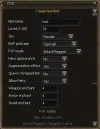
Autobots can be configured from low level 1 up to level 80 third-class characters.
Available configuration includes:
- Name
- Level
- Class
- Sex
- Title
- Recommendations
- Clan - The clan can be added as clanID through lucera_autobots DB table, the clan has to be owned by a real player.
- Farming radius
- Respawn delay
- Weapon enchant
- Armor enchant
- Jewelry enchant
- Custom equipment
- Hero status
- Visual weapon augmentation
- Buff profile
- PvP mode
- Party permission
- Olympiad mode
- Auto-spawn
- AI enable / disable
PvP Modes
Each bot can use one of the available PvP modes:
- Idle
- Attack Flagged
- Attack Everyone
Party Logic
Each Autobot can individually control whether Party Logic is available.
Creation option:
Allow Party: No / Yes
Default:
If enabled, the bot can accept party invitations from real players and use the Party Logic system.
Party Logic includes:
- Following the real player party leader
- Randomized 70–100 range positioning
- Assisting the appropriate damage dealer
- Dedicated support/healer behavior
- Temporary main assister selection if the leader dies
- Temporary assister selection when the real leader is a support class
- Existing PvP mode integration
- Idle farming near the leader
- Resurrection waiting
- Party cleanup
- Return-to-farm handling
the bot refuses party invitations from real players.Allow Party = No
Olympiad Autobots are always party-disabled.
Olympiad Autobots
The extension includes a dedicated Olympiad subsystem.
Currently supported Olympiad classes:
- Sagittarius
- Moonlight Sentinel
- Ghost Sentinel
- Adventurer
- Wind Rider
- Ghost Hunter
- Archmage
- Soultaker
- Mystic Muse
- Storm Screamer
They do not replace or bypass the native competition lifecycle.
Registration uses:
Code:
CompetitionType.CLASS_FREE- Registration
- Competition state
- Stadium teleport
- Match start
- Match end
- Native scoring
- Match limits
- Olympiad points
- Equipment restrictions
- Skill restrictions
Equipment System
Equipment overrides are stored separately from the main saved-Autobot table.
Supported equipment slots include:
- Weapon
- Shield
- Helmet
- Chest
- Legs
- Gloves
- Boots
- Necklace
- Left / Right Earrings
- Left / Right Rings
This prevents equipment configuration from becoming inconsistent if a bot's name changes.
External Buff Profiles
Buff packages are stored externally in:
This allows server administrators and developers to modify buff packages without recompiling the extension.gameserver/config/autobots_buff_profiles.xml
Available profile categories include:
- Fighter
- Warrior
- Tank
- Archer
- Dagger
- Mage
- Support
Custom Death-Return Paths
Saved Autobots can optionally use manually configured routes when returning to their farming location after death.
Configuration file:
| gameserver/config/autobots_path.xml |
- Database ID
- Name
- Class
- Level
- Custom route starting position
- Ordered waypoint path
XML:
<bot classId="94" id="91" level="76" name="BotName">

  <start x="123456" y="-12345" z="-1234"/>  <!-- Set where the bot teleports after TOWN_IDLE state here. -->

  <path>
    <!-- Add ordered waypoint coordinates here. Maximum: 256 waypoints. -->
    <point x="123456" y="-12345" z="-1234"/>
  </path>
</bot>
The <path> section contains the ordered coordinates that the bot should follow for reaching it's initial configured farming location.
Maximum supported route size:
If <path> contains no valid waypoints, the custom route remains disabled and the bot uses the normal recovery system.256 waypoints per bot
When a custom path is configured, the recovery flow becomes:
The custom starting point does not replace the bot's permanent saved farming location.Death → Village → Town Idle → Teleport to custom <start> → Follow configured waypoints → Reach farming area → Return to normal farming state
It is used only as the starting point of the custom recovery route.
Bad Route Protection
Custom paths include a fail-safe system.
If a bot cannot make meaningful progress toward its current waypoint for approximately:
the route is considered invalid or unreachable.5 seconds
The gameserver console prints a warning similar to:
The bot then performs:WARN [AutobotsPath] WARNING: Bad XML route for bot "Bot_Name" at waypoint "X". Falling back to normal recovery lifecycle.
This prevents incorrectly configured XML coordinates from permanently trapping an Autobot.Scroll of Escape → Town → Town Idle → Ignore custom route for this recovery cycle → Normal direct return
The custom path is skipped only for that recovery cycle.
After a future death, the bot is allowed to try its configured custom route again.
Party Death Recovery
Party Logic includes its own death-recovery handling.
If a bot that is inside a party dies:
If the bot is resurrected, it resumes Party Logic normally.Death → Wait up to 60 seconds for resurrection
If no resurrection occurs:
Party Logic bots therefore also support:Village → Leave party → Town Idle → Custom return path, if configured → Otherwise normal direct return
| autobots_path.xml |
Automatic Database Setup
The extension automatically creates and maintains its required database structure when it loads.
Normally, no manual SQL installation is required.
Main table:
| lucera_autobots |
When newer Autobots builds introduce additional database fields, the extension can automatically add missing columns to an existing installation.
This allows older Autobots databases to migrate to newer builds without requiring the administrator to manually modify the table structure.
Equipment Table
The extension automatically creates:
| lucera_autobots_items |
The table uses:
| bot_id |
| lucera_autobots.id |
Deleting a saved Autobot also removes its associated equipment row automatically.
Equipment Database View
For easier database inspection, the extension also creates:
| lucera_autobots_items_view |
| bot_id bot_name |
equipment columns
This makes it easier for administrators to identify which equipment configuration belongs to each saved Autobot.
If the SQL view cannot be created for any reason, the actual Autobots equipment system continues to function normally.
Important notes:
buff_mode:
0 = Full Buff
1 = Clan Hall Buffs
2 = No Buffs
pvp_mode:
0 = Idle
1 = Attack Flagged
2 = Attack Everyone
Compiling for Another Lucera Revision
The compiled extension should not simply be copied blindly between different Lucera revisions.
The correct approach is to compile the source against the target revision's current dependencies, including:
and any other Lucera libraries/extensions required by that revision.server.jar
scripts.jar
jts_bots.ext.jar
If your Lucera revision differs from the one this build was compiled against, for example in:
- Method names
- Method signatures
- Class locations
- Visibility
- Internal APIs
- Phantom APIs / lifecycle
- Olympiad internals[
A successful compilation against a different revision than mine does not always guarantee full runtime compatibility, so the extension should also be tested after recompiling, especially:
- Bot spawning
- Movement / combat
- Party Logic
- Recovery logic
- Equipment
- Olympiad
Latest Version — M84
The extension is designed to remain isolated from Lucera core files and to use Lucera-native server systems wherever possible.
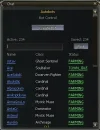
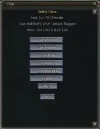
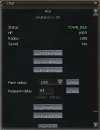
On in-game, use //autobots command and create bots normally through the panel's options.
NOTE: The bots will not attack a gm character.
The extension has only been tested locally and it currently is an on-going development project. It is NOT recommended to be loaded in a live server yet and needs more testing.
On in-game, use //autobots command and create bots normally through the panel's options.
NOTE: The bots will not attack a gm character.
The extension has only been tested locally and it currently is an on-going development project. It is NOT recommended to be loaded in a live server yet and needs more testing.
Attachments
Last edited: