

Change Skill Casting Bar Type
@Deazer If this can be added to a future update as a config would be nice.
I was trying to modify the skill casting bar in the Classic client to make it look more like the Interlude version, but i couldn't find the classes responsible for this and it turned out to be quite a headache.
In this guide we simply instruct the server to use a different casting-bar style that the Classic client already supports and listens to it, without requiring any client-side modifications.
Requirements
Instructions
1. Open server.jar with your Java bytecode editor.
2. Inside server.jar, navigate to the l2.gameserver.network.l2.s2c package (Server-to-Client packets) and locate these two classes:
3. Inside each class, find the writeImpl() method.
4. Find the first writeD(0) immediately after the packet opcode and change it to your preferred casting type.
Before (Original Cast Type 0):
After (Cast Type 2):
Apply the same change to MagicSkillLaunched, keeping its original opcode unchanged.
5. Save the modified server.jar, shutdown your Gameserver, replace the original server.jar, and start your GameServer.
Casting Types
Important: Change only the first writeD(0) in both packet classes.
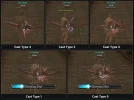
The images below shows how the skill casting bar appears for each cast type. In each example, the skill is cast immediately after a bow auto-attack.
@Deazer If this can be added to a future update as a config would be nice.
I was trying to modify the skill casting bar in the Classic client to make it look more like the Interlude version, but i couldn't find the classes responsible for this and it turned out to be quite a headache.
In this guide we simply instruct the server to use a different casting-bar style that the Classic client already supports and listens to it, without requiring any client-side modifications.
Requirements
- Java bytecode editor
- Make sure you have a backup of your original server.jar
Instructions
1. Open server.jar with your Java bytecode editor.
2. Inside server.jar, navigate to the l2.gameserver.network.l2.s2c package (Server-to-Client packets) and locate these two classes:
Code:
l2.gameserver.network.l2.s2c.MagicSkillUse
l2.gameserver.network.l2.s2c.MagicSkillLaunched
3. Inside each class, find the writeImpl() method.
4. Find the first writeD(0) immediately after the packet opcode and change it to your preferred casting type.
Before (Original Cast Type 0):
Java:
writeC(0x48);
writeD(0);
After (Cast Type 2):
Java:
writeC(0x48);
writeD(2);
Apply the same change to MagicSkillLaunched, keeping its original opcode unchanged.
5. Save the modified server.jar, shutdown your Gameserver, replace the original server.jar, and start your GameServer.
Casting Types
- Type 0: Original default Classic casting bar
- Type 1: Same as Type 0
- Type 2: Cyan overhead casting bar
- Type 3: Green overhead casting bar
- Type 4: No visible skill casting bar
Important: Change only the first writeD(0) in both packet classes.
The images below shows how the skill casting bar appears for each cast type. In each example, the skill is cast immediately after a bow auto-attack.
Last edited:
